It begins!

At the tail-end of last week we completed the basic operating system builds of our new servers, including all of those awkward and pernickety things like the activation process, making sure they’re fully patched and anti-virus enabled. I also presented what felt like thousands of arrays for our soon-to-be-created mailbox databases. OK, so it was only 220 database arrays, ten log arrays and ten restore ones but I’m very glad that scripting came to my aid for creating volumes, formatting disks and creating all of those mount points.
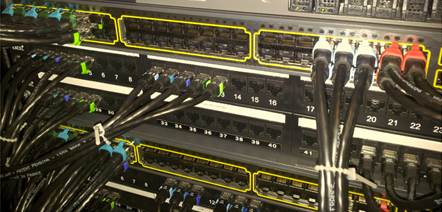
Network cables with colour-coded functions

In hardware terms I’ve tried to make a big leap forward in our networking set-up as our racks are so visible: it doesn’t look good for a high-profile service like Nexus to be a bad example in a shared data centre! To try and keep each server’s cabling organised, logical and neat we’ve moved away from our previous system of colour-coding each network cable by function. That approach, while logical, didn’t look as neat as I felt might be possible. So this time I’ve used PatchSee cables with only a different coloured boot clip to identify each function. These cables also have a useful benefit of including a fibre-optic thread running down their length: both ends can be identified by light, without the need to unplug anything.

No, not that one, it's this one!

So our next step is to begin the stress-testing. Today we’ve been running JetStress against the new disk arrays to ensure that their performance matches our expectations. Since this procedure needs to fill the disks almost to capacity we had planned to allow as long as two days. Early indications however suggest that by this time tomorrow it will all be done. This process is an essential step as it will provide the baseline benchmark against which real performance can be compared once Exchange 2010 is installed.

I have one final picture I wanted to post here. It’s actually a couple of weeks old – since it was taken we’ve done all of the cabling and sourced the (mysteriously absent) C19-C20 cables we needed to connect our secondary mains feed into our UPSs to then on to the managed PDU strips. Sadly we won’t need the UPS  kit for very long – our intention is to relocate these servers, post upgrade, into the new university Shared Data Centre  which has two power feeds and centralised UPS provision.

The current live Exchange 2007 service runs on the left-hand pair of racks and the right-hand pair is the new infrastructure for Exchange 2010. You can see each of this site’s five mailbox servers (HP ProLiant DL380 G7s with a pair of six-core processors and 48GB of RAM) with their three disk arrays directly under each server. On the right-hand rack, under the bottom mailbox server’s disks, are this site’s three physical client-access servers (HP ProLiant DL360 G7s with similar processor/memory configuration). The six physical CASs, three per site, will be supplemented by a further six virtual CASs which we intend will host the IMAP service. Hub Transport functions will also be virtualised with six VMs fulfulling that role. The whole installation process kicks off with new CASs – and the first one is now under way…
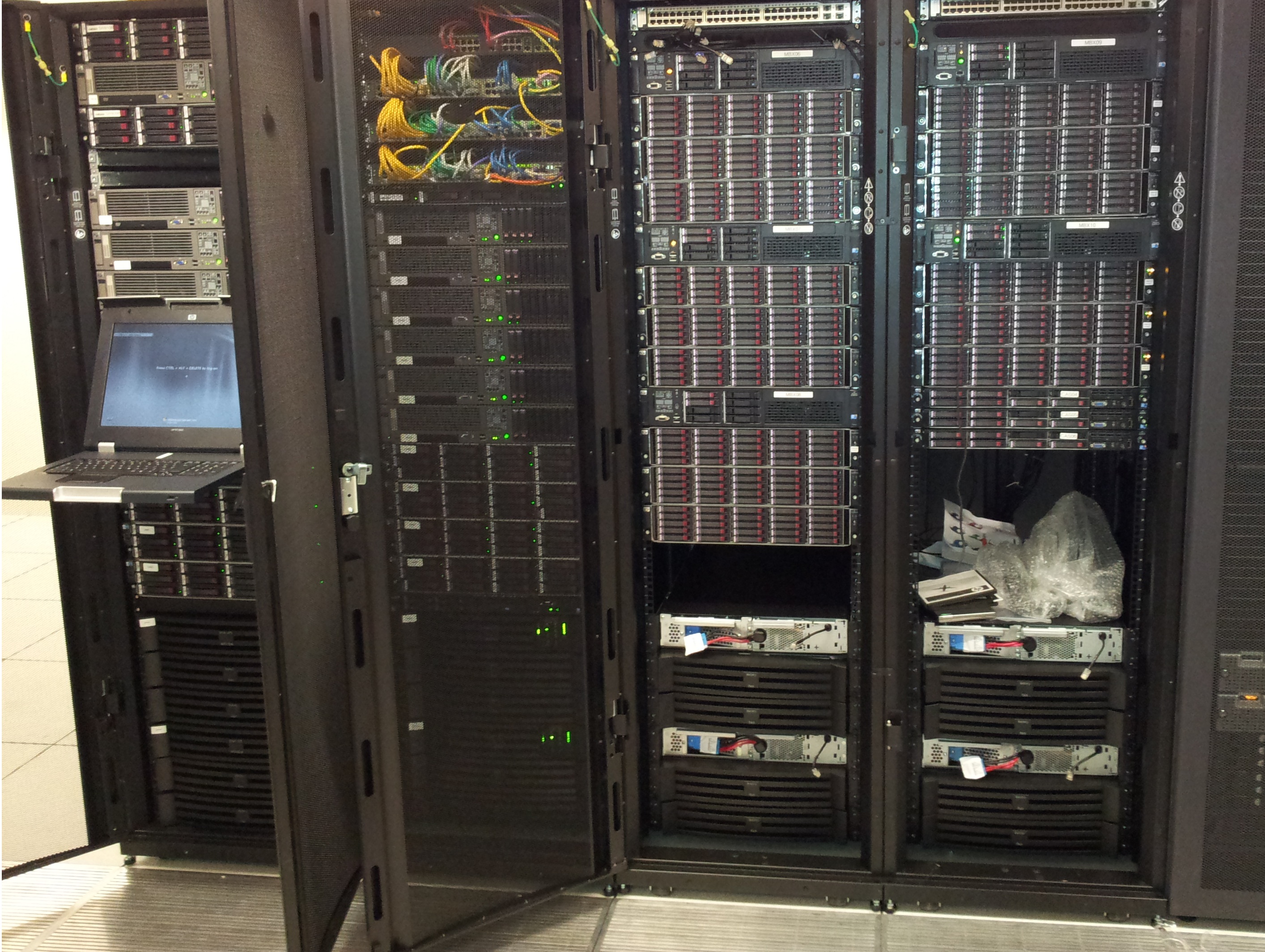
Begbroke site racks
Posted in Uncategorized | Comments Off on It begins!

Mobile users on Nexus

As part of our upgrade plans we needed to have a better grasp of the numbers of mobile Nexus  users and, more importantly, what they’re using to connect up to our service.

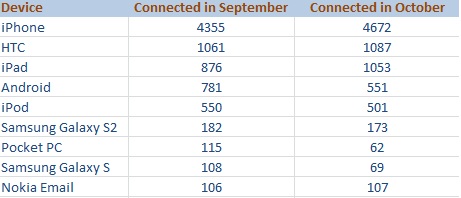
I have therefore started documenting monthly statistics of devices that have used Nexus in the last thirty days.  After two datasets have been collected there are the beginnings of some (mildly) interesting figures. Note that to avoid listing dozens of obscure products the table here only shows those devices used by at least 100 Nexus users.

Mobile devices (those used by at least 100 users only)

The top mobile device connecting to Nexus is of course the iPhone. Apple’s iPad also represents a heavy proportion of our users although iPod usage has dipped, perhaps indicating the start of a trend.

Android trends are a little harder to see because of the way that different manufacturers choose to identify their products. We have over 200 devices that don’t figure in this data because only the IMEI is supplied to our servers, in lieu of proper identification.

Devices that only use the generic identifier of ‘Android’ represent a group almost as numerous as the iPad although the manufacturer isn’t exactly obvious from such a broad identifer. To try and make sense of numerous model versions I have collected together all of HTC’s assorted product offerings into a single group. By doing this HTC more obviously represents the next largest manufacturer, of Nexus mobile clients, after Apple.

I should perhaps have also collected together Samsung’s products in the same way – it would be 366 and 315 devices for September and October respectively – but I chose to leave them separate due to personal bias: I own a Galaxy S2. I’ve only shown the two Galaxy models here as the other Samsung models were used by fewer than 100 Nexus users.

The number of still-active PocketPC users was also a surprise – I didn’t think many would still be using one in anger. And the figures for Nokia are perhaps an indication of just how far that manufacturer has fallen from grace.

One final note – Windows Phone users weren’t yet numerous enough to feature prominently here but, admittedly from a very low starting point of 47 in September, the numbers of Windows Phone users is up by 25% in a month. I’ll continue to collect these figures and, if they’re sufficiently interesting, they’ll appear here too in due course.

Posted in Uncategorized | 1 Comment

Schema update

It is a prerequisite for Exchange 2010 that we upgrade the Active Directory schema. Quite simply, without a schema update we can’t install the product. But other maintenance work we’ve done in recent months, such as that taken to resolve hidden PDFs sent from a Mac, necessitated a schema update too.

In an ideal world this would have meant we were saved a task – being fully up-to-date on Exchange 2007  should save us from further updating tasks. But no, it has actually painted us into a corner. The original release of Exchange 2010 used a schema version that is now below the level we’re operating on. So the original ‘release to manufacturing’ version of Exchange 2010 can no longer be installed here because of the service packs we’ve applied. Here’s how it has worked out:

Schema versions

2007 SP3 14625 11222 11221
2010 RTM 14622 12640 12639
2010 SP1 14726 13214 13040

It’s only the ‘rangeupper’ value that we’re interested in right now. This is the first of the three number strings shown for each version above – our current ‘range upper’ value is 14625  – and as you can see it’s higher than the un-updated version on Exchange 2010.
So we’ll actually be deploying straight to the most current version of Exchange 2010. Currently it’s Service Pack 1  Update Rollup 5 but it’s probable that Service Pack 2 will be released before we get too far.

Meanwhile, back to the task at hand. Fortunately it’s pretty easy to update the schema:

  1. From a command prompt, check the current rangeupper value is what you’d expect. You can check with adsiedit but I just used dsquery as it’s faster:
    dsquery * CN=ms-Exch-Schema-Version-Pt,cn=schema,cn=configuration,dc=domainname,dc=ox,dc=ac,dc=uk -scope base -attr rangeUpper
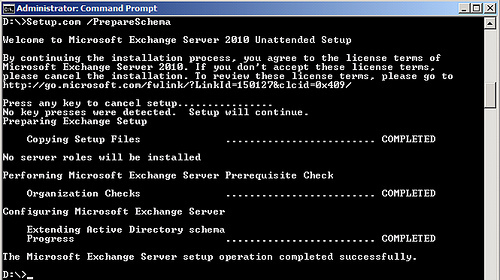
  2. From the Exchange 2010 SP1 media, run setup.com with the ‘prepareschema’ (or ‘ps’) switch. The command has a stop-me-if-you-want-to-cancel mode:  just wait and it’ll proceed by itself:

  3. Run dsquery again – the rangeupper value should now be 14726.
  4. Er, that’s it.

This is one of those jobs that should be uneventful – but one with mammoth repercussions if it broke Active Directory…
By getting it out of the way early it’s one less issue that could cause a loss of service when the big rollout starts.

    Posted in Uncategorized | Comments Off on Schema update

    Exchange 2010 Detailed Design

    The High-Level design has now been completed and is about to be approved – in principle – and we’ll then enter the Detailed Design phase. This is expected to be completed by mid September at which point it can then be signed off and the work will all begin in earnest.

    The first parts of our new infrastructure – the bits we know we’ll need, whatever the design – including power distribution boards, rack blanking plates etc. have now been delivered. Our UPS systems for the additional Begbroke infrastructure have also now arrived and are just waiting for the racks in which they’ll reside.

    We still have lots more hardware to arrange, some of which is still not firmly specified, but if it all continues to arrive as planned we should be able to begin installing software at some point in October.

    Posted in Uncategorized | Comments Off on Exchange 2010 Detailed Design

    Nexus upgrade to Exchange 2010

    Our High Level Design has now been revised in order to incorporate additional fault tolerance features.

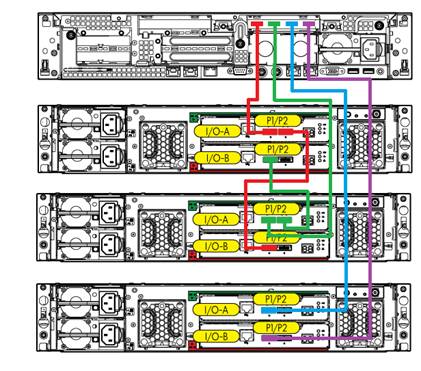
    Cascaded enclosures

    Cascaded enclosures

    We had some concerns with our original design that even a minor failure within a disk shelf  would lead to service failing over to that store’s passive copy. While that in itself isn’t an issue – there still shouldn’t be any user effect – it seemed sensible to revise the plan to ensure that a localised hardware failure would have the smallest possible impact on the system.

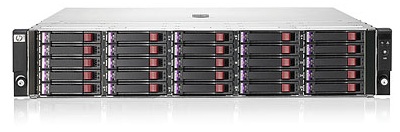
    D2700 Disk Enclosure

    D2700 Disk Enclosure

    So now we intend to attach three (instead of two) D2700 disk enclosures to each mailbox server. The sizing exercise had shown us that we need fewer servers than anticipated so this actually represents a cost reduction too: more fault tolerance and at a lower cost!

    Each enclosure contains 25 2½” 10k rpm 300GB SAS disks, giving us a total of 75 disks available to each mailbox server. These will be divided into 22 database LUNs, each utilising one disk from each of the three enclosures, to create a RAID5 array that can tolerate failure of either a single disk or a whole enclosure. This accounts for 66 of the 75  disks.

    Transaction logs will be allocated two disks per enclosure, a total of  six disks across the three disk shelves, provisioned as a RAID1+0 array. The remaining three disks will be used to create a two-disk recovery LUN (on which the inevitable ‘I’ve deleted half of my email’ restore tasks can take place) and a hot-spare that can operate across all three enclosures.

    Posted in Uncategorized | Comments Off on Nexus upgrade to Exchange 2010