Dates for courses this term

Dear WebLearn Users

Here are the course dates for WebLearn courses during Michaelmas Term 2010. Note that bookings are essential and open 30 days in advance of each course: http://www.oucs.ox.ac.uk/itlp/courses/

There is now a regular course on using the Survey tool in WebLearn, as well as a new course offered in conjunction with the Oxford Learning Institute: Learning and Teaching using technology tools, which is aimed at academic staff members.

WebLearn: Fundamentals

Thursday 28 Oct 2-5 pm (week 3)

Thursday 25 Nov 2-5 pm (week 7)

Tuesday 7 Dec 9:15-12:15 (week 9)

WebLearn: Migrating your content

Monday 1 Nov 2-5 pm (week 4);

Thursday 2 Dec 2-5 pm (week 8)

WebLearn: Making your site work

Wednesday 3 Nov 9:15-12:15 am (week 4)

WebLearn: Surveys

Monday 8 Nov 2-5 pm (week 5)

Learning and Teaching: using technology tools

Wednesday 24 Nov 9:15-12:15 (week 7)

Plagiarism: WebLearn and Turnitin

Thursday 18 Nov 12:30-13:30 (week 6)
Posted in e-learning, WebLearn | Tagged , | Leave a comment

Sakai and JASIG Foundations To Pursue Merger

Early this year, Jasig, the parent organization for uPortal, CAS, Bedework and other open source software serving higher education, and the Sakai Foundation, which supports the Sakai Collaboration and Learning Environment, formed Board-level groups to examine ways the two organizations could collaborate more closely. These Strategic Alliance Committees, led by Jasig Chair Aaron Godert, and Sakai Foundation Chair Josh Baron, met in New York in September to consolidate the outcomes of their discussions and bring proposals to their respective Boards.

See: http://sakaiproject.org/news/jasig-and-sakai-foundations-pursue-merger

Posted in Sakai | Leave a comment

Old WebLearn user importer now fixed

The problems with old WebLearn have now been fixed. New students should now be able to access their material.

The problem related to the format of the data which is used as a basis for the creation of accounts for new users. Our thanks go to the OUCS Registration team for fixing the problem so swiftly.

New WebLearn was not affected.

16.45pm Thursday 7th October 2010

Posted in Old WebLearn | Tagged , | Leave a comment

Become a member of the Sakai Foundation Board

A note from Ian Dolphin (Executive Director, Sakai Foundation). Please contact the central team if you are interested:

Over the course of October and November the Sakai Foundation will be holding elections for two positions on the Foundation Board. In line with Foundation by-laws, Josh Baron, of Marist College, ends his first three year elected term this December, and Jutta Trevinarus, of the Ontario College of Art and Design, ends her second term. I would like to offer my thanks, on behalf of the community, for their leadership in supporting Sakai over the years.

Anyone may be nominated for one of the two positions, although we would appreciate your best efforts to discover the willingness of anyone you may nominate to stand. Please forward your nomination to Mary Miles – mmiles@sakaifoundation.org – by midnight Monday October 18th (US Eastern Time).

Voting will take place between October 30th and November 12th, and will be open to Sakai Foundation Institutional Representatives. Further details of candidates, together with details of how to vote will be mailed to Institutional Representatives in advance of the voting period. The availability of candidates details will be notified on this list.

I would remind you that Board members may be elected for a maximum of two consecutive terms. The Sakai Foundation by-laws may be found at

  1. http://sakaiproject.org/foundation-bylaws
Posted in Sakai, WebLearn | Leave a comment

Survey tool now available

survey-group-coloured

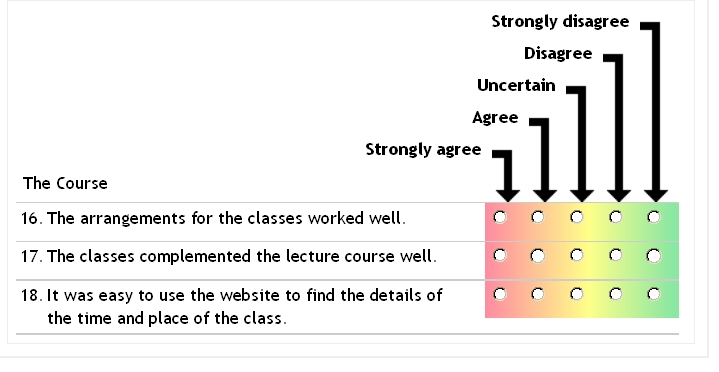
The WebLearn Survey tool (released as a Beta) can be used to design and manage electronic questionnaires to be delivered on-line. Surveys can be created to gather data for research purposes, general data gathering, or for course, lecturer or tutor evaluation, feedback and review.

Questionnaire templates can be created from scratch, or existing templates can be copied and modified. Various question types are available, such as Lickert scales, multiple choice with a single answer, multiple choice with multiple answers, and free text questions. Detailed settings control open and close dates, how participants access the survey, and who may view the results.

Links

  1. Surveys Step-By-Step guide
  2. Surveys  Least You Need To Know Guide
  3. Reserve a space  on the “WebLearn: Surveys” course
  4. Survey tool case study
  5. Comparison of survey tools
Posted in e-learning, Sakai, WebLearn | Tagged , , , , , , | Leave a comment

SunGuard become Sakai partners

“Malvern, Pa., September 28, 2010 — SunGard Higher Education and rSmart today announced a partnership regarding the Sakai Collaboration and Learning Environment (CLE), an enterprise community-source teaching, learning and research collaboration system. The partnership provides colleges and universities with comprehensive support to adopt the rSmart Sakai CLE as well as integration with select SunGard Higher Education solutions.”

SunGuard of course sell the ‘Banner’ student records system and are major players in the world of UK HE student systems. This partnership can only be a good thing for Sakai (and by implication, WebLearn).

More info: http://www.rsmart.com/node/2161

Posted in e-learning, Sakai, WebLearn | Tagged | Leave a comment

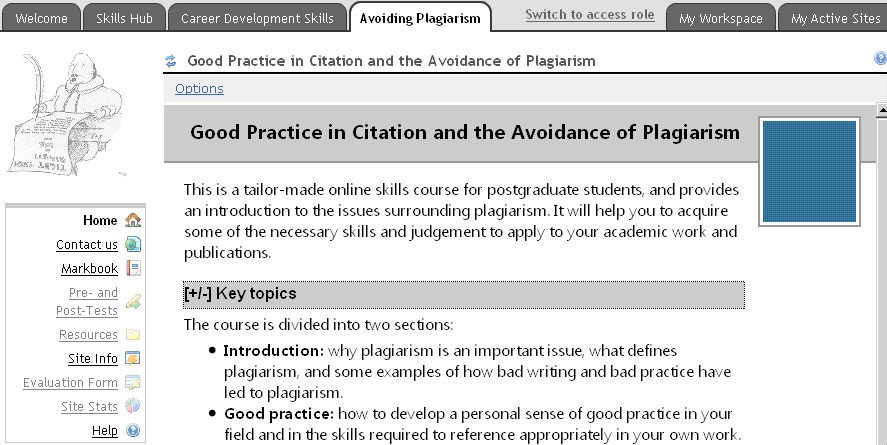
University Skills Group online skills courses now hosted in WebLearn

The WebLearn team has been working closely with the University Skills Group (USG – formerly the Graduate Skills Advisory Group) to move the former ‘Online courses’ (now called ‘Career Development Skills’) into new WebLearn. The courses were previously hosted within a different VLE service (provided by Continuing Education) which required a special username and password.

plag-course

In addition to being moved to WebLearn which is protected by Oxford Single Sign On credentials, the courses have been updated to the latest versions. They now employ the WebLearn Tests tool for quizzes and the Survey tool for users to provide feedback. The conversion was a major piece of work which involved not only programming changes to Sakai tools, but also integration with the existing content packages.

There are 14 courses covering Avoidance of Plagiarism, Career Planning, Conferences, Entrepreneurship, Ethics, Intellectual Property, Project Management, Publishing, and Managing Your Supervisor.

Although the courses are aimed at graduate students and researchers, they are available to all Oxford users. Access them via the Skills Hub link on the WebLearn Welcome Page (then select Research Skills Toolkit), or go to this direct link: https://weblearn.ox.ac.uk/portal/hierarchy/skills/generic

Posted in e-learning, WebLearn | Tagged , , , , , | Leave a comment

WebLearn User Group – 29 Sep 2010, 2-4 in OUCS

You are invited to join us at OUCS for our next meeting to hear about the latest updates to the system and share ideas about WebLearn practice:

NEXT MEETING of the WebLearn User Group: Michaelmas Term 2010

Wednesday 29 September 2-4 pm, followed by our traditional cream tea Booking is essential (and is now open)


Agenda:

Posted in e-learning, WebLearn | Tagged , , | Leave a comment

Video tutorial guides for site managers

The WebLearn team employed a student intern over the summer to produce video screencast tutorials demonstrating the use of some of the most important tools in WebLearn. The 18 videos are now available on the WebLearn Guidance site listed as “Video tutorials” under the “Guides and tutorials” section.

Video tutorials provide users with short ‘just-in-time’ visual demonstrations of particular tools. The topics have been subdivided into short sections covering two or three tasks within a particular tool, and lasting only two or three minutes.

We decided for reasons of accessibility to produce the videos using written scripts only. The script can then be read out by screen readers, and hearing-impaired users are not at a disadvantage. At a later stage, voice-overs may be added, if time permits.

The tools that have been covered:

  1. Site info (manage site)
  2. Resources (share documents)
  3. Home tool (front page)
  4. Web Content link
  5. WYSIWYG HTML editor

Other tools will be covered later.

Links

  1. index of videos
  2. guidance site
Posted in Sakai, WebLearn | Tagged , , , , , , , | Leave a comment

TurnItIn2 – overview of changes

This is from the TurnItIn newsletter and refers to the submit.ac.uk service.

Turnitin now has a new interface and a number of new features. For many it has been a welcome change, and for others there may be a learning curve. For people who are not quite ready to make the switch, it is easy to go back to the older, more familiar versions of the Originality Report and GradeMark. At this point, over 80% of users are using the NEW version of the Turnitin2 Originality Report and GradeMark tools.

Here’s an overview of the changes:

Document Viewer Frame

The Turnitin tools are available in a unified view allowing you to see a paper in its original format PLUS multiple sources of feedback all at once. You can view the Originality Report matches and GradeMark comments in superimposed layers on an image of a paper in its original format; PeerMark feedback will be accessible from this unified view soon. Now, an instructor can see the highlighted matches from an Originality Report while simultaneously grading the paper with GradeMark.

Navigation

Tabs for user information, help, and feedback now appear along the top right section of your screen. Access to your libraries, calendars and discussion boards is provided by the tabs in the upper left of your screen along the top of the main activity area.

Assignment Inbox

Changes to the assignment inbox include:

  1. The GradeMark apple icon has been replaced by a “comment bubble” icon and a grade icon.
  2. The “submit” button has been relocated below the assignment title.
  3. Assignment settings are now easily accessible through a link labeled “assignment settings.”
  4. Arrows for navigating between pages of the inbox appear at the top and bottom of the inbox.
  5. Actions like “Delete”, “Move to…” and “Download” only appear if one or more papers are selected with the check boxes.

Libraries

The QuickMark Manager and Rubric Library for GradeMark are now available from the “Libraries” tab in the instructor’s view of the class. Now, instructors can create sets of commonly used marks and rubrics before the first paper is submitted to an assignment.

Getting to know Turnitin2

  1. Comprehensive web page about Turnitin 2 http://submit.ac.uk/static_jisc/ac_uk_what_is_new.html
  2. 4-minute Walk-through Video http://turnitin.com/static/support_video_gallery_walkthrough.html
  3. Live Walk-through Schedule (pdf) http://submit.ac.uk/resources/documentation/turnitin/training/Turnitin_Daily_Training.pdf
  4. Quickstart Guides http://submit.ac.uk/static_jisc/ac_uk_training.html
  5. Answers to Frequently Asked Questions about Turnitin2 (pdf) http://submit.ac.uk/resources/documentation/turnitin/sales/Turnitin2_FAQ_UK.pdf
Posted in e-learning, Turnitin | Tagged , , | Leave a comment